A seamless DVD player for your PC!
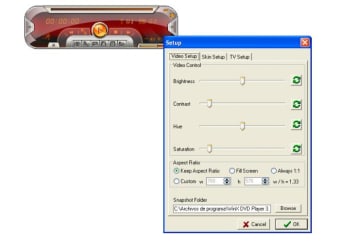
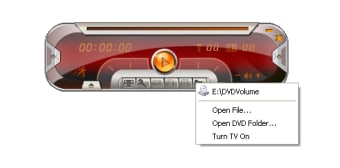
WinX DVD Player is an easy-to-use, straightforward, and feature-packed DVD player, which provides you with excellent video and audio quality. Most importantly, the program supports a wide range of file formats, such as MP4, AVI, RM, DIVX, XVID, WMV, DAT, MPEG, RMVB, RMA, WMA, ASF, VOB, and MP3. This DVD ripper comes with all the functions you’d expect in a high-quality multimedia tool. The simple and clean interface lets you access the important functions via the floating toolbar. From the main interface, you can also access various menu and language options. If you’re using a Windows PC, WinX DVD Player is a good choice.
Top Recommended Alternative

A high-quality DVD player with good features!
If you’re looking for a DVD player online, it can be quite hard to find the right one. While some players don’t offer good video and audio quality, others don’t support certain file formats. However, WinX DVD Player trumps the competition with exceptional quality, plenty of features, and support for various files.
Additionally, the program is free to use, and you don’t have to worry about paying a fee or subscription. Compared to VLC Media Player, it has a simple interface, which might look outdated to some users. Nevertheless, while using WinX DVD Player, you’ll not be disappointed with the ripping and playback speed.
Is WinX DVD Player easy to use?
As mentioned earlier, WinX DVD Player comes with a user-friendly interface. The program allows you to import a DVD folder from the hard disk or a CD-ROM. You can even use the file browser to drag and drop files in the designated area. All you need to do is select certain parameters, choose the destination format and folder, and initiate the file playback or conversion process.
Digiarty Software has tried to make everything accessible from the main interface. In the first look, it seems a bit cluttered, but you won’t take much time getting used to the floating toolbar and plenty of features. Compared to CyberLink PowerDVD, WinX DVD Player comes with a user-friendly interface, allowing you to play or rip DVDs within seconds.
Apart from the support for multiple file formats, WinX DVD Player comes with an advanced set of functions. For instance, the tool lets you set bookmarks for specific sections in a video. This helps you pause the playback and access the footage anytime with ease. It’s just another way in which WinX DVD Player turns out to be a user-friendly program.
Additionally, the tool allows you to create a playlist, which can comprise your favorite tracks or films. Moreover, you can also take screenshots, and the program saves the output file in a preferred format. Since WinX DVD Player is a lightweight tool, you don’t have to worry about system performance, and can keep the program running in the background without lags or crashes.
Does WinX DVD Player customize quality?
When it comes to sample frequency rate, audio quality, video quality, format, resolution, volume, and other parameters, the program lets you configure settings with ease. As such, you can set preferences, and don’t need to settle with the default parameters in a file. In addition to this, you can select the subtitle language, disable the option to display subtitles, and preview DVDs. Last but not least, WinX DVD Player allows you to set the specific start and end time to trim videos.
Since the program doesn’t put much pressure on system resources, it takes a while to finish ripping jobs. For a free tool, it still offers good speed, and you don’t have to wait for more than a few minutes. Most importantly, the excellent audio and video quality ensure you’re not disappointed after using the program.
Does WinX DVD Player have advanced features?
As mentioned earlier, WinX DVD Player comes with a wide range of features. Compared to KMPlayer and PotPlayer, this tool offers support for screenshots, bookmarks, multiple file formats, subtitles, and more. Its easy-to-navigate interface and subtle color scheme allow you to use the media player without any issues. Since the output files are high quality, this free tool can give tough competition to most leading DVD players available online.
Needs some improvements
While WinX DVD Player is a good tool, it comes with a few drawbacks. For instance, the download and installation process takes some time, and you could even notice a few bugs. Moreover, the registration message keeps popping up every few minutes. If you’re trying to concentrate on ripping a file, this can be tedious and distracting.
Similarly, while the floating toolbar is a good feature, it doesn’t disappear in full-screen mode. As such, it can be distracting in the middle of a video. When you hover over the several options in the program, you don’t get any sort of information about the feature. You need to manually use each one, unless identified via the icon, to get clarity on usage.
As mentioned earlier, WinX DVD Player comes with a simple interface. However, compared to popular media players, it looks a bit outdated. Having said that, WinX DVD Player is a good program, which lets you play and convert DVDs into multiple file formats. If you’re looking for a free tool that supports various formats, ensures high-quality playback and conversion, and doesn’t require technical skills, WinX DVD Player is worth checking out.
An easy-to-use, effective DVD player!
If you’re looking to use a free DVD player, WinX DVD Player won’t disappoint. While the trial version comes with limited features, they’re sufficient for personal use. With plenty of features, simple interface, support for various file formats, and high-quality conversions, this amazing tool makes it easier to enjoy your favorite content. While the program needs some subtle improvements, none of the drawbacks is a dealbreaker. If you’re using a Windows PC, you can start using WinX DVD Player from the get-go.